
Stop Breaches Before They Escalate: Indicator of Compromise IP Protection in SonicOS 8

How SonicWall Gen 8 firewalls automatically detect and block communication with malicious infrastructure before attackers gain a foothold.
The Problem: Malware Gets In. Then It Calls Home.
Perimeter defenses stop a large volume of threats, but they do not stop all of them. Attackers know this. When malware successfully compromises a device inside your network, its first action is almost always the same: establish a connection to an attacker-controlled server. This is called command-and-control (C2), and it is the moment an infection becomes a breach.
From that C2 connection, attackers can issue instructions, deliver additional payloads, escalate privileges, or exfiltrate data. The window between initial compromise and C2 is narrow and blocking that outbound connection is one of the highest-value actions a firewall can take.
The challenge is that C2 servers are not unknown. Security researchers, threat intelligence communities, and detection platforms continuously identify and publish the IP addresses of malicious infrastructure. The question is whether your firewall can act on that intelligence automatically, in real time.
SonicOS 8 answers that question with Indicator of Compromise (IoC) IP Protection.
SonicOS 8 introduces Indicator of Compromise (IoC) IP Protection: a capability that connects SonicWall firewalls to live threat intelligence feeds and automatically blocks connections to and from known malicious IP addresses. It stops malware command-and-control (C2) communication before it can be established, requires no manual rule creation, and updates every hour. |
What Is an Indicator of Compromise?
An Indicator of Compromise (IoC) is a piece of evidence that a system has been compromised or is actively communicating with malicious infrastructure. IoCs take many forms: suspicious file hashes, anomalous DNS lookups, unusual process behavior. For network security, the most directly actionable IoCs are IP addresses.
Known malicious IP addresses include:
- Command-and-control (C2) servers: infrastructure used by attackers to remotely control malware on infected devices
- Botnet nodes: compromised systems used to distribute attack traffic, spam, or credential stuffing
- Known attacker infrastructure: IP ranges and hosting providers associated with specific threat actors
- Active exploit delivery points: servers distributing exploit kits, ransomware payloads, or dropper malware
Threat intelligence organizations track these addresses continuously, publishing and updating feed lists that can be consumed by security tools. IoC IP Protection in SonicOS 8 makes those feeds actionable at the firewall level, automatically and in real time.
How IoC IP Protection Works in SonicOS 8
The feature operates in three stages: feed ingestion, database maintenance, and real-time enforcement.
Stage 1: Feed Ingestion
SonicOS 8 connects to external threat intelligence feeds over HTTPS (HyperText Transfer Protocol Secure) and downloads lists of known malicious IP addresses.
Organizations with their own threat intelligence sources can add custom feed URLs. Any HTTPS-hosted feed in a compatible format can be integrated, allowing the firewall to consume proprietary intelligence from security operations teams or third-party vendors.
Stage 2: Database Maintenance
Downloaded feeds are compiled into an internal IoC IP database maintained on the firewall. The database is updated automatically at a configurable interval, with a default of one hour. This ensures that newly identified malicious infrastructure is reflected in enforcement decisions without requiring manual updates or policy changes.
The Diagnostics tab provides visibility into database state at any time: number of IoC entries, lookup requests processed, resolved detections, and lookup failures. Administrators can also manually query any IP address to check whether it is classified as a malicious indicator.
Stage 3: Real-Time Enforcement
Once the database is populated, enforcement is immediate. Any connection attempt to or from a listed IP address is blocked in real time, in both directions. This covers inbound connection attempts from malicious sources and, critically, outbound connections initiated by compromised devices inside the network.
Blocking is applied before the connection completes. There is no data exchange, no partial session, and no opportunity for the attacker to deliver instructions or receive exfiltrated data.
IoC enforcement operates on both inbound and outbound traffic. Blocking outbound connections from infected devices is the critical control that prevents malware from establishing command-and-control after initial compromise. |
Practical Example: Stopping a Command-and-Control Attempt
Consider an endpoint inside your network that has been infected by malware through a phishing email. The malware attempts to establish a connection to its command-and-control server.
Without IoC Protection
The firewall has no knowledge that the destination IP is associated with malicious infrastructure. The outbound connection is permitted. The attacker receives confirmation that the malware is active, issues commands, and begins the next phase of the attack. The compromise escalates.
With IoC Protection Enabled
The destination IP is present in the firewall's IoC database, identified through one of the active threat intelligence feeds. The sequence is:
- The firewall checks the destination IP against the IoC database before the connection is established.
- The IP matches a known malicious indicator. The connection is blocked immediately.
- The user sees a block notification page, providing transparency without exposing technical details.
- The event is logged, giving the security team a timestamped record of the blocked attempt and the affected endpoint.
The attacker receives nothing. The malware sits dormant, unable to receive instructions. The security team has a clear investigative lead.
The infected endpoint still requires remediation. IoC protection contains the blast radius of the compromise. It does not replace endpoint detection and response, but it removes the attacker's ability to act on the infection while remediation is underway. |
Configuring IoC IP Protection
IoC IP Protection is configured in the SonicOS management interface under Policy > Indicators of Compromise > IP Addresses. The configuration is organized across four tabs.
Block Connections to/from IoC IP Addresses
This setting activates enforcement. Once enabled, the firewall begins blocking all traffic matching IoC-listed IP addresses. Two enforcement scope options are available:
- All Connections: IoC enforcement applies globally to every connection passing through the firewall. This is the recommended default for most deployments.
- Firewall Rule-Based Connections: IoC enforcement is applied selectively, based on individual access rules. This allows specific zones, interfaces, or traffic types to have IoC enforcement applied independently.
Per-rule enforcement is configured on individual access rules under the Security Profiles tab. Each rule can be set to Global mode, which uses the default feed configuration, or Custom mode, which assigns specific feeds to that rule only. This works alongside existing Geo-IP and intrusion prevention settings.
External Threat Feeds
.png)
The External Files tab is where threat intelligence feeds are managed. Administrators can:
- Add custom feeds: enter any HTTPS feed URL and set a refresh interval
- Set update intervals: configure how frequently each feed is re-downloaded (default: one hour)
Each feed can be added or removed independently from enforcement, giving administrators control over which intelligence sources contribute to enforcement decisions without removing them from the configuration.
Logging
When logging is enabled, every blocked IoC connection is recorded in the firewall event log with full details: timestamp, source and destination IP, matched feed, and direction of the blocked attempt. This provides the security team with:
- Incident investigation data: a precise record of which endpoints attempted connections to malicious infrastructure and when
- Threat correlation: the ability to cross-reference blocked IoC events with endpoint detection logs, identifying infected devices for remediation
- Compliance evidence: timestamped records demonstrating that malicious connection attempts were detected and blocked
Customizable Block Page
When a connection is blocked due to an IoC match, users can be redirected to a customizable notification page. Administrators can configure the alert message text and include a custom logo using a Base64-encoded image. This gives organizations control over how the block event is communicated to users, maintaining a consistent and professional experience while enforcing security policy.
Quick Reference: Configuration Settings
| Configuration Setting | Location in SonicOS |
| Enable IoC enforcement | Policy > Indicators of Compromise > IP Addresses > Settings tab |
| Set enforcement scope | Settings tab > Block Connections > All Connections or Firewall Rule-Based |
| Add or manage threat feeds | External Files tab > Add (built-in or custom URL) |
| Enable logging | Settings tab > Enable Logging toggle |
| Customize block page | Settings tab > Enable Block Page > configure message and logo |
| Per-rule IoC scope | Policy > Access Rules > Edit Rule > Security Profiles tab > IoC toggle |
Diagnostics and Visibility
The Diagnostics tab provides a real-time view of IoC database activity. Administrators can monitor:
- Number of IoC entries: total count of IP addresses currently in the active database
- Lookup requests: total number of connection checks performed against the IoC database
- Resolved IoC detections: count of connections that matched a malicious indicator and were blocked
- Lookup failures: any errors in feed download or database update operations
The Diagnostics tab also supports manual IP lookups. Administrators can enter any IP address and check whether it is currently classified as a malicious indicator. This is useful during incident investigations when validating whether a specific address of interest is present in the active feed data.
IoC Protection in the SonicWall Security Architecture
IoC IP Protection is one layer in a multi-engine security stack. It works alongside, not instead of, other SonicWall security capabilities:
- Intrusion Prevention System (IPS): detects and blocks known exploit patterns and attack signatures within traffic payloads
- Gateway Anti-Virus: inspects files and downloads for malware signatures at the network perimeter
- Capture ATP sandboxing: submits unknown files for behavioral analysis in an isolated environment
- Botnet filtering: blocks connections to known botnet infrastructure based on domain and IP reputation
- DNS Security: intercepts malicious domain resolution requests before a connection is even attempted
Each layer addresses a different phase or vector of an attack. IoC IP Protection specifically targets the command-and-control phase, filling a gap that signature-based engines and sandbox analysis are not designed to address. Together, these technologies create a defense-in-depth architecture where an attacker must defeat multiple independent controls to succeed.
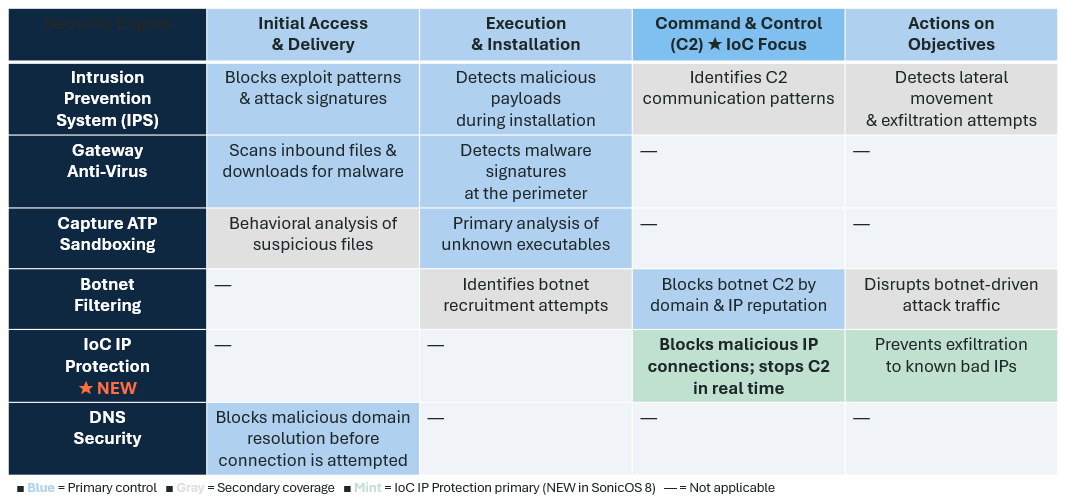
Table: SonicWall security engines mapped to attack phases. Shading intensity indicates primary versus supplementary coverage at each stage. IoC IP Protection is the primary control for the command-and-control phase.
Who Benefits from IoC IP Protection (Use Cases)?
Enterprise Security Operations
Security operations teams managing large network environments benefit from IoC IP Protection's logging and diagnostics. Every blocked command-and-control attempt is a high-fidelity alert: the affected endpoint is identified, the malicious IP is recorded, and the timestamp is available for correlation with other security events. This reduces investigation time and gives analysts a clear starting point for incident response.
Compliance-Driven Environments
Organizations subject to PCI-DSS, HIPAA, or CMMC requirements need demonstrable controls over outbound connections to malicious infrastructure. IoC IP Protection provides a timestamped, logged record of every blocked connection attempt, supporting audit and compliance reporting without additional tooling.
SMB and Branch Office Deployments
Smaller organizations and branch offices often lack dedicated security operations resources. IoC IP Protection provides automated, intelligence-driven protection with no ongoing manual management. Feed updates happen automatically. Enforcement requires no rule maintenance. The protection is active from the moment the feature is enabled.
Managed Security Service Providers
MSSPs managing firewalls on behalf of customers can use per-rule feed assignment to apply different threat intelligence sources to different customer segments or traffic profiles. Custom feed URLs allow proprietary intelligence to be deployed alongside built-in feeds, giving service providers the flexibility to deliver differentiated protection tiers.
Frequently Asked Questions
What platforms support IoC IP Protection?
IoC IP Protection is available on Gen 7 and Gen 8 SonicWall firewalls running SonicOS 8.
Does IoC IP Protection require manual rule creation?
No. Once the feature is enabled, enforcement is automatic. Threat intelligence feeds are downloaded and updated on a configurable schedule, with a default interval of one hour. No manual rule creation or policy changes are required.
Does IoC protection block all malware?
No. IoC IP Protection specifically targets the command-and-control phase of an attack by blocking connections to and from known malicious IP addresses. It works alongside other security layers, including IPS, Gateway Anti-Virus, and Capture ATP, which address different phases of an attack.
Can I use my own threat intelligence feeds?
Yes. Any HTTPS-hosted feed in a compatible format can be added as a custom feed. Organizations with proprietary threat intelligence can integrate those sources directly into SonicOS 8 enforcement.
What happens after a C2 connection is blocked?
The connection is dropped before any data is exchanged. The event is logged with full details, and the user can be redirected to a customizable block page. The infected endpoint still requires remediation, but the attacker is unable to issue commands or receive data while that remediation is underway.
Conclusion
The window between initial compromise and command-and-control is narrow. IoC IP Protection in SonicOS 8 closes it by turning community threat intelligence into real-time firewall enforcement, automatically, without manual rule creation or policy changes.
The result is concrete: malware on an infected device cannot reach its attacker. The breach is contained. The security team has the data they need to investigate and remediate. And the protection stays current without any intervention, because the threat feeds update on their own.
IoC IP Protection is available now on Gen 7 and Gen 8 SonicWall platforms running SonicOS 8. It is one of five new capabilities in this release, each designed to address a specific gap in network security operations.
Learn More
| Resource | Where to Find It |
| Configuration guide | |
| FAQs | https://www.sonicwall.com/support/knowledge-base/sonicos-8-ioc-faq/kA1VN000001Im8r0AC |
| Contact support |
Share This Article

An Article By
An Article By
Georgy Thadathil
Georgy Thadathil

Leelin Thye
Senior Manager, Product Marketing
Leelin Thye
Senior Manager, Product Marketing

